Most business websites do not have a shortage of good pictures. They have good pictures delivered badly. A designer retouches a product photo, a marketer uploads the finished file to WordPress, and nobody owns the step in between, which is image optimization.
Knowing where image editing stops and image optimization starts is the fastest way to stop shipping oversized files, and treating image optimization as a repeatable process is cheaper than fixing pages one at a time.
This separates the two jobs, shows what current evidence says about why the difference matters, and gives you a handoff workflow you can apply this week.
What Image Editing Actually Covers
Image editing is the creative and corrective work done to the picture itself. Cropping, retouching, balancing exposure and color, replacing a background, adding headline text to an ad, compositing several photos, all of it is image editing. The output is a master file, and the only question it answers is whether the image looks right and says what the business needs it to say.
Editing usually happens at full resolution, often in a layered or lossless working format, because the editor needs room to make changes without damaging the result. That is exactly why an edited master is a poor candidate for publishing. It was built for flexibility, not for a visitor on a phone.
What Image Optimization Actually Covers
Image optimization is the delivery side of the job: getting the smallest file that still looks right at the size a visitor actually sees, in a format the browser can display, at the moment it is needed. The Web Almanac describes image weight as the product of three things: pixel dimensions, the encoding format, and the amount of compression applied. Image optimization works on all three, then adds delivery decisions on top, such as which image loads first, which can wait, and how each one is described to search engines and screen readers. httparchive
Google’s image guidance explains why this is more than cosmetic. It observes that pictures frequently account for more of a page’s weight than anything else, so they can make pages slow and costly to load, and it asks site owners to apply current optimization and responsive image techniques.
Image Editing vs Image Optimization: The Practical Differences
The two jobs blur easily because they touch the same file. This table separates them by purpose, owner and consequence.
The two overlap in only one place: resizing. A designer may crop to a specific aspect ratio for composition, and the image optimization step then scales the result down to the dimensions the page really displays. Mixing up those two resize jobs is where many problems begin.
| Image editing | Image optimization | |
|---|---|---|
| Main goal | Make the image look right and carry the message | Make the file light, fast and discoverable |
| Typical owner | Designer, photographer, in-house creative | Web developer, marketer or CMS administrator |
| When it happens | Before the image is approved | After approval, before or during publishing |
| What it changes | Content, composition, color, text | Dimensions, format, compression, metadata, loading behavior |
| How success is judged | Brand fit and visual quality | File size, loading speed, accessibility, indexing |
| Cost of skipping it | Weak or off-brand visuals | Slow pages, wasted bandwidth, missed image search visibility |
Why the Image Optimization Step Gets Skipped, and What It Costs
In the Web Almanac 2025 Page Weight chapter, based on a July 2025 crawl, the median home page transferred 2.56 MB on mobile and 2.86 MB on desktop. Images accounted for 911 KB of the mobile median and 1,058 KB of the desktop median, more than the 632 KB of JavaScript on mobile. Medians for each resource type come from different pages, so they should not be added together or divided into a percentage share. What they do show is that images are the heaviest single category on a typical home page. httparchive
Speed also has a search dimension. Google recommends that site owners aim for good Core Web Vitals, including a Largest Contentful Paint of 2.5 seconds or less, and says these signals align with what its core ranking systems seek to reward. That is not a ranking guarantee, and a fast page will not rescue thin content. Largest Contentful Paint (LCP) is image-heavy by nature, though. Web.dev defines it as the moment the biggest visible image, block of text or video finishes rendering, so a hero image often decides the score. googleweb
For a business this becomes a question of ownership. If editing signs off the image and nobody is accountable for image optimization, the heavy file goes live by default.
Where Editing Ends and Image Optimization Begins: A Handoff Workflow
A clean handoff turns one approved master into several light delivery files.
- Finish editing on the master. Archive the layered or full-resolution file. Never publish it.
- Decide the display size. Find the widest the image will appear in your layout. Many teams export at about twice that width for high-density screens, which is worth testing on your own pages.
- Resize from the master. Start from the original, not from a copy that was already compressed.
- Pick a format for the content. Image optimization treats photographs and flat graphics differently, as covered below.
- Compress and compare. Judge the result at the size visitors see, not zoomed in.
- Name and describe. Give the file a descriptive name and write alt text.
- Publish and measure. Check the page in PageSpeed Insights and confirm which element is the Largest Contentful Paint.
WordPress softens the worst cases. Since version 5.3 it scales down any upload larger than 2,560 pixels on either side, uses the scaled copy as the largest size and keeps the original in the uploads folder. That threshold is generous, though. A 2,560 pixel image is far bigger than most layouts need, so the safety net prevents extreme cases rather than doing image optimization for you. wordpress
Illustrative scenario (hypothetical, not a documented case) a furniture retailer’s photographer delivers product photos 4,000 pixels wide, and the product grid displays them at 800 pixels.
That is five times the width and height, so each file carries 25 times the pixels the layout can show. File size will not fall in exact proportion, but resizing first is usually where the biggest saving appears, which is why it comes before any quality slider.
Common Mistakes When Businesses Confuse Editing with Image Optimization
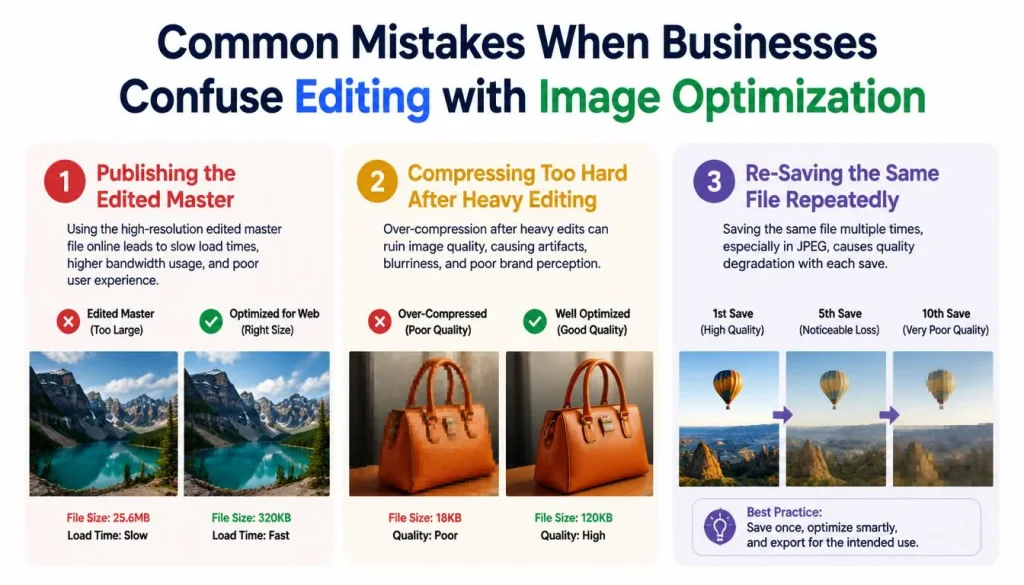
Publishing the Edited Master
What you notice: pages feel slow on phones even though every image looks sharp. Why it happens: the file was exported for editing flexibility, so its dimensions and size far exceed what the layout shows. How to confirm, open Chrome DevTools, go to the Network tab, filter by images and sort by size, then compare each file’s pixel dimensions with the space it occupies on the page. PageSpeed Insights also names the Largest Contentful Paint element.
The fix, apply image optimization to a copy, following the workflow above. How to check it worked, repeat the test and compare the file size and the Largest Contentful Paint time.
Compressing Too Hard After Heavy Editing
What you notice, blocky patches, smudged edges or banding in gradients. Why it happens: lossy formats such as JPEG permanently discard detail, and one aggressive setting ignores how different a photograph is from a logo.
The fix, compare outputs at display size, raise the quality or switch to a lossless format for logos and text, and keep the master so you can start again. How to check it worked: view the result at its real size on both a phone and a desktop screen.
Re-Saving the Same File Repeatedly
Every time a lossy file is opened and saved again, it is re-encoded, which can stack up artifacts. Sound image optimization exports each delivery size once, directly from the master, so you never have to rebuild from a degraded copy when a platform later asks for a different size.
Choosing Formats and Dimensions: The Core Image Optimization Decisions
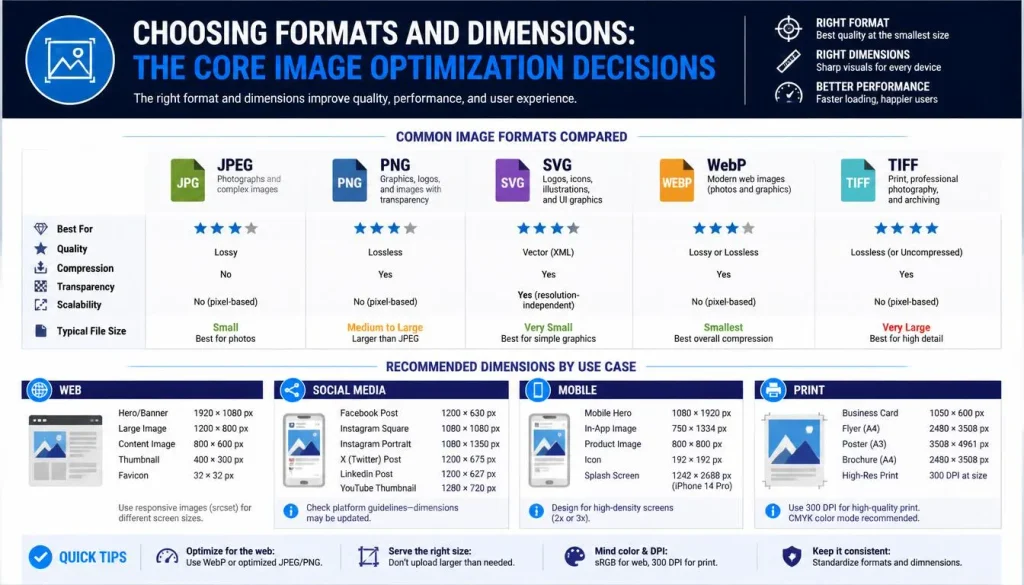
Format choice is where image optimization for web delivery gets technical, but the rules are manageable. MDN’s format guide describes JPEG as a good lossy choice for still images and recommends PNG when you need more precise reproduction or transparency. It adds that WebP and AVIF compress better than both, and that AVIF in particular offers much better compression, so you should include a fallback using the picture element. mozilla
Google Search can index images in BMP, GIF, JPEG, PNG, WebP, SVG & AVIF formats, so adopting modern formats does not limit visibility in image results. WordPress added AVIF upload support in version 6.5, provided the hosting environment’s image library supports it, and you can check this under Tools, Site Health, Info, Media Handling. WordPress’s announcement claims AVIF can cut file size by as much as half compared with JPEG at equal quality. Treat that as a vendor claim to test on your own images. Google image SEO best practices +2
A sensible image optimization default for most business sites is JPEG or WebP for photographs, PNG or SVG for logos and sharp graphics, and AVIF where your server and workflow support it with a fallback in place. That is a recommendation, not a requirement.
Image Optimization for SEO and Accessibility
Editing makes an image attractive. It does nothing to help a search engine or a screen reader understand it. Image optimization in SEO depends on a handful of habits that Google documents directly, and they double as image SEO best practices for accessibility.
- Use standard image elements. Google finds images in the src attribute of an img element, even inside a picture element, and it does not index CSS background images.
- Write real alt text. Google calls alt text the most important attribute for image metadata & warns that stuffing it with keywords creates a poor experience and can look like spam.
- Name files plainly. A short descriptive file name gives Google a light clue about the subject, which beats a camera default.
- Place images near relevant text. Google reads captions and surrounding content to understand what an image shows. google
- Consider an image sitemap if images are hard to discover through normal crawling.
These image optimization steps make SEO images for website pages easier to interpret, but none of them guarantees an image ranking or a particular preview in search results.
Case Study: What Nuvemshop Teaches About Image Optimization
Context. Nuvemshop is an ecommerce platform in Latin America that powers more than 180,000 online stores. It published its results on web.dev on June 24, 2026. web
Problem. At the start of 2025, only 48% of its stores passed Core Web Vitals & 57% had healthy Largest Contentful Paint. The team first suspected image weight or server latency and reported that this hypothesis was wrong. Merchants could arrange homepage sections in any order, and the browser sometimes picked an unexpected element as the Largest Contentful Paint candidate.
The team found three root causes: CSS transitions delayed when elements counted as visible, lazy loading was applied to images at the top of the page, and the most important images had no priority signal. web
Method. The platform removed transitions from first-position sections, removed lazy loading from the first image in the first section, added a high fetch priority only where an image could genuinely be the Largest Contentful Paint candidate, and reduced latency through edge caching.
Documented outcome. Between January 2025 and January 2026, the share of stores with healthy Largest Contentful Paint rose from 57% to 96%, and the Core Web Vitals pass rate rose from 48% to 72%. For mobile visitors arriving from Google organic search in a cohort of Brazilian stores, conversion rate rose 8.9% and cart engagement rose 8.4%. web
Limitations. The figures are self-reported, the changes were bundled with edge caching, and a year-over-year cohort comparison is not a controlled experiment, so other factors may have contributed.
Lesson. The biggest gains did not come from squeezing files smaller. They came from deciding which image loads first and making sure nothing delayed it. Image optimization covers delivery behavior as well as file size, and editing tools cannot do that part. The team also warned that marking too many images as high priority backfires, because a page cannot prioritize everything at once.
Image Optimization on WordPress: What Core Handles and What It Does Not
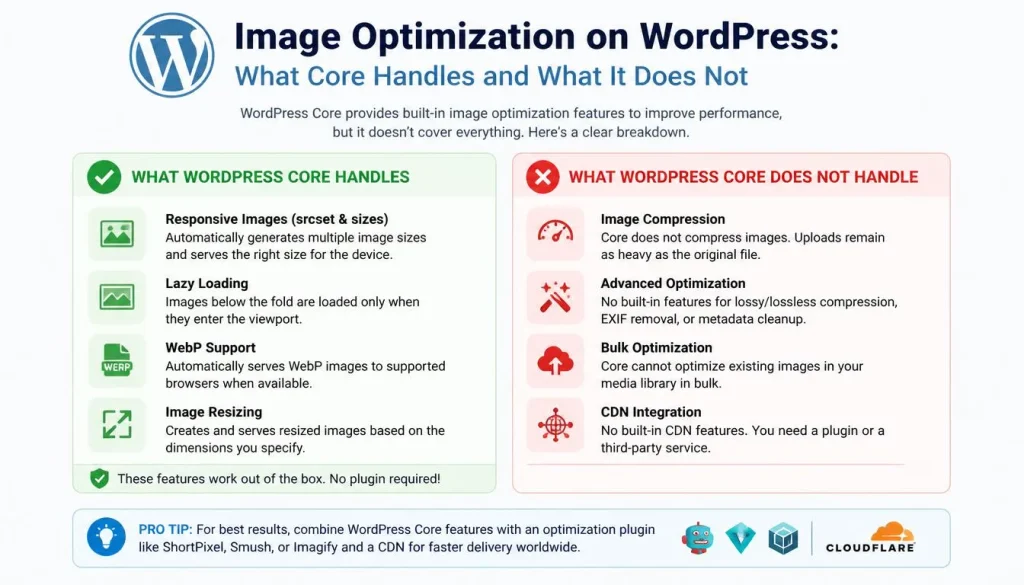
WordPress has taken over some image optimization decisions. Since version 6.3 it automatically adds a high fetch priority to the image it judges most likely to be the Largest Contentful Paint element, and WordPress’s own note says this typically improves that metric by 5 to 10 percent.
Its field analysis of real sites found a larger effect where a site had previously lazy-loaded its main image: after fixing it, mobile Largest Contentful Paint improved by 16% to 21% and desktop by 6% to 9%. wordpresswordpress
Two cautions apply. First, the detection is an automatic judgment, so confirm in your page source that it picked your real hero image, particularly when a page builder or template part supplies the layout. WordPress will not override a loading or priority attribute you set yourself, and it warns against combining high priority with lazy loading on the same image.
Second, core cannot judge what an image shows. Alt text, composition-based cropping and the right display dimensions for your theme remain human decisions. For a deeper technical walkthrough, see this complete guide to image optimization for business websites. searchenginejournal
Choosing Tools: Free Compressors, Online Optimizers or an Automated Workflow
No single tool is the best image compressor for every business, so choose against criteria rather than rankings.
- Which formats it reads and writes, and whether WebP or AVIF are included.
- Control over maximum width and quality, not just a single preset.
- Privacy: whether files are processed on your device or uploaded to a server.
- Metadata handling, such as removing GPS location before images go public.
- File size limits and batch support if you publish many images.
- A before-and-after preview so you can judge quality at display size.
For occasional uploads, a free image compressor or a free image optimizer in the browser is usually enough, and image optimization online tools are convenient for one-off jobs. The free Compress Image tool on this site, according to its own description, runs in the browser for files added from your device, accepts JPG, PNG and WebP files up to 25 MB, starts its quality slider at 75, offers a maximum width setting & removes metadata including GPS location. It does not export AVIF.
If you publish hundreds of images, automating image optimization through a pipeline, plugin or image CDN applies the same rules every time instead of relying on manual steps. compressimage
Be careful with any image compressor without losing quality claim. Lossless compression keeps every pixel but saves less, while lossy compression saves more by discarding detail. The practical test is whether a difference is visible at the size your visitors see. Our walkthrough on how to compress JPG files without losing quality shows that comparison step in more detail.
Conclusion
Image editing and image optimization answer different questions. Editing asks whether the picture is right. Image optimization asks whether the file is right for the screen, the browser and the search engine that will meet it. Businesses that treat them as one step end up publishing editing masters, compressing blindly, or ignoring how images load.
Images are the heaviest category on the median home page, at 911 KB on mobile in the 2025 Web Almanac data. Google wants Largest Contentful Paint within 2.5 seconds, and the main image often decides it. Nuvemshop’s results show that image optimization depends on delivery priority as much as file size, and WordPress core now handles some of that work while leaving format, dimensions and descriptions to you.
The most useful next step is small. Pick your highest-traffic page, identify its Largest Contentful Paint image, compare the file’s dimensions with the space it fills, fix that one image through the handoff workflow, and measure again over the following weeks, since field data updates gradually. Results depend on your pages, hosting and audience, so treat every improvement as something to verify rather than assume.
Frequently asked questions
Which image optimizer is the best?
No single tool wins for every site. Pick one that supports your formats, lets you control width and quality, and handles privacy and metadata the way you need.
What is the best way to name images for SEO?
Use short, descriptive, lowercase names with hyphens, such as blue-ceramic-mug-front.jpg. Avoid generic names like IMG00023.JPG or image1.jpg.
Do image file names matter for SEO?
Yes, but only a little. Google says file names give only light clues about an image’s subject, so alt text and surrounding page content matter more.
Can ChatGPT edit photos?
Yes. You can upload a photo and describe the change you want, such as swapping a background or adjusting colors, though it works best for simple touch-ups. It is not a full replacement for professional editing software, and features may vary by plan
How can I optimize my images for SEO?
Resize each image to its display size, compress it, and use descriptive file names and alt text. You can resize and compress with the free Compress Image tool.