Image optimization is the practice of delivering the smallest file that still looks right at the size a visitor actually sees, in a format their browser can decode, at the moment it is needed. For a business website, image optimization is rarely cosmetic. Hero banners, product photos and team portraits are usually the heaviest files on a page, and one of them often decides how quickly the page looks ready.
This explain why image optimization matters, what it delivers, what published before-and-after evidence shows, and how to apply it step by step, from image format choice to Core Web Vitals.
Why Image Optimization Matters for Business Websites
Why image optimization starts with page weight
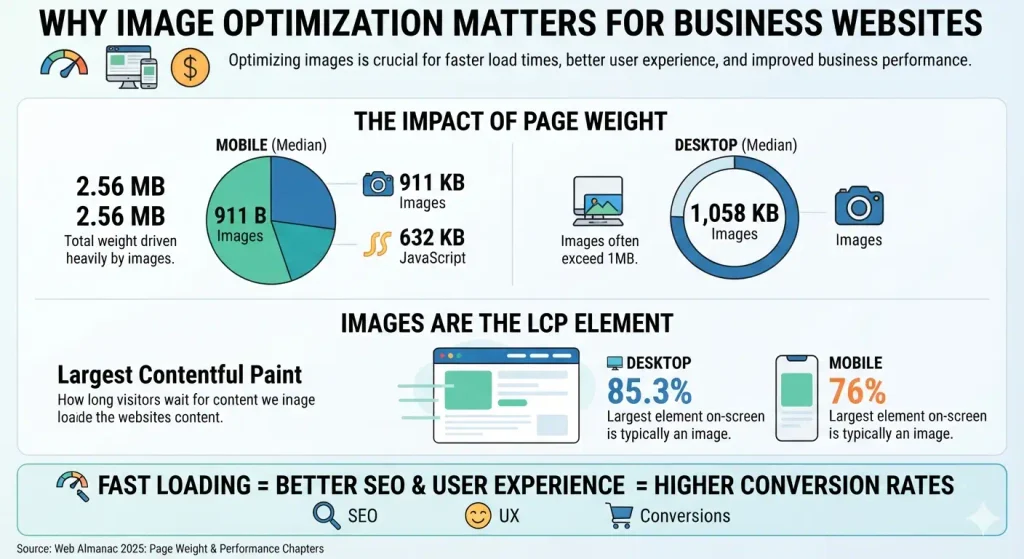
The Web Almanac’s 2025 Page Weight chapter puts the median mobile home page at 2.56 MB, with 911 KB of it in images, more than the 632 KB of JavaScript. On desktop home pages the image median is 1,058 KB. Images are also what visitors tend to wait for: the Performance chapter found an image as the largest on-screen element (the LCP element) on 85.3% of desktop pages and 76% of mobile pages.
Why mobile visitors and distance raise the stakes for image optimization
That same chapter shows how uneven results are. A good LCP was achieved by 74% of desktop sites but only 62% on mobile, and just 48% of mobile origins passed all three Core Web Vitals. If customers in the USA, Australia or Canada browse on phones while your server sits an ocean away, a hero image that never received image optimization pays twice: more bytes to send and more distance to travel.
Benefits of Image Optimization
The benefits of image optimization fall into five practical areas.
- Faster perceived loading. Image optimization shortens the time the browser spends downloading the main visual.
- Search support, with realistic expectations. Google’s Core Web Vitals documentation recommends good scores and says they align with what its core ranking systems reward, as one part of broader page experience. Treat image optimization as support, not a ranking guarantee.
- Better conversion odds. Vodafone’s A/B test, covered below, tied a 31% LCP improvement to 8% more sales.
- Lower bandwidth and hosting load. Effective image optimization means fewer bytes per view, so less data for visitors and less transfer for you.
- Accessibility. Image optimization includes text alternatives, which let screen reader users understand each image.
Image Optimization and Core Web Vitals
Google’s threshold research on web.dev classifies a page as “good” when at least 75% of visits meet the target.
| Metric | Measures | Good | Poor | Role of images |
|---|---|---|---|---|
| LCP (Largest Contentful Paint) | Loading | 2.5 s or less | Over 4 s | Direct and large |
| INP (Interaction to Next Paint) | Responsiveness | 200 ms or less | Over 500 ms | Minor, mostly JavaScript |
| CLS (Cumulative Layout Shift) | Visual stability | 0.1 or less | Over 0.25 | Direct, through missing dimensions |
LCP: where image optimization has the most effect
The Almanac describes LCP as four sequential phases: server response (TTFB), resource load delay, resource load duration and element render delay. Image optimization attacks the middle two. Smaller files shorten load duration, while discoverable markup and correct priority shorten load delay.
CLS: reserve space for every image
Without explicit dimensions, the browser lays out an image with no height, then pushes content down when the file arrives. The Almanac found that 62% of mobile pages and 65% of desktop pages leave at least one image unsized, so reserving space belongs on every image optimization checklist.
INP: a limited role
INP is dominated by JavaScript work, and in the Almanac data 77% of mobile sites already had good INP. Image optimization is not your main lever here, so do not expect it to fix a sluggish menu.
Before and After: What Documented Results Show
Published image optimization results rarely isolate images from other fixes, so read these as direction, not promised gains.
| Case | What changed | Reported result | Limitation |
|---|---|---|---|
| Vodafone Italy (web.dev, 2021) | A/B test: server-side rendering plus resized hero image, optimized SVG and PNG files, and no loading of off-screen images | LCP 8.3 s to 5.7 s (31%), 8% more sales | Images not isolated from other changes |
| WordPress 6.3 sites (field analysis, 2023) | Stopped lazy-loading the LCP image and added priority hints | 16% to 21% better mobile LCP, 6% to 9% on desktop | Applies only to sites that had the problem |
| Google Flights test (Fetch Priority) | Raised hero image priority | LCP 2.6 s to 1.9 s | One page, test conditions |
| Tokopedia (web.dev) | Server rendering, preloaded LCP element, image compression, WebP, lazy loading | 55% LCP gain, 23% longer sessions | Bundle of techniques |
A reproducible image optimization test for your own site
This is a procedure, not a result, because I have not tested your pages.
- Run the page through PageSpeed Insights and record field LCP, lab LCP and the identified LCP element.
- Compare that image’s file dimensions with the size it displays at.
- Apply the image optimization fixes in the sections below.
- Re-run the lab test under the same settings, then watch field data over the following weeks.
Choosing the Right Format for Image Optimization
| Format | Best for | Transparency | Notes |
|---|---|---|---|
| JPEG | Photographs | No | Works everywhere; lossy |
| PNG | Logos, screenshots, sharp text | Yes | Lossless; poor choice for photographs |
| SVG | Icons, logos, diagrams | Yes | Vector; scales without blur |
| WebP | Photos and graphics | Yes | Supported by all major browsers |
| AVIF | Photos where size matters most | Yes | Chrome 85, Edge 121, Firefox 93, Safari 16.1 |
MDN’s image format guide says lossy AVIF is around 50% smaller than comparable JPEG and recommends a fallback because support has little historical depth. Image optimization adoption lags the technology: the Almanac found JPG on 57% of LCP images, PNG on 26%, WebP on 11% and AVIF on 0.7%.
<picture>
  <source srcset="team.avif" type="image/avif">
  <source srcset="team.webp" type="image/webp">
  <img src="team.jpg" alt="Our support team at the Toronto office" width="1200" height="800">
</picture>
Google Search supports BMP, GIF, JPEG, PNG, WebP, SVG and AVIF, per its image SEO documentation, so modern formats do not limit image indexing.
Image Optimization Basics: Resizing and Compressing Without Visible Quality Loss
Resize first
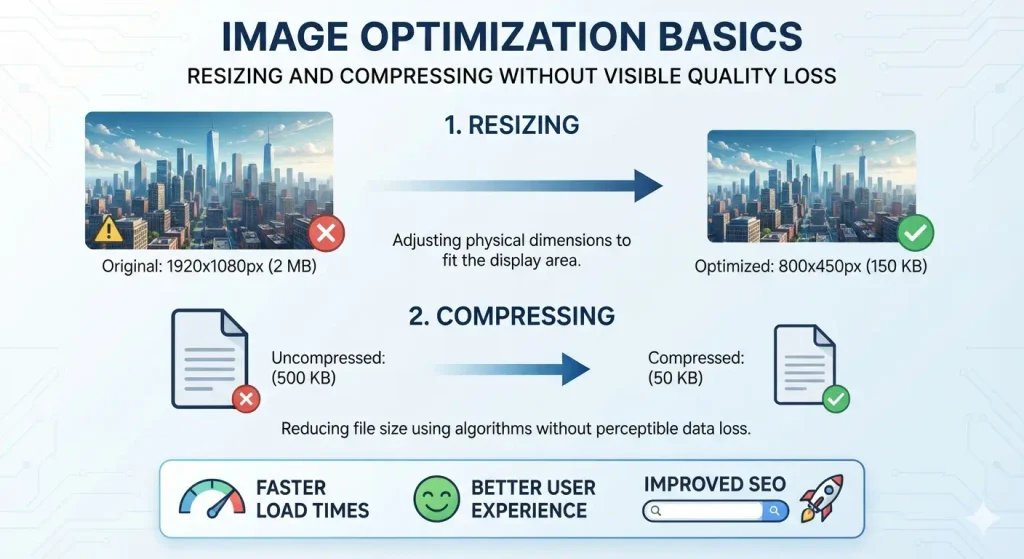
In image optimization, dimensions matter more than quality sliders. A 4,000-pixel photo displayed in an 800-pixel column carries 25 times more pixels than anyone sees. Find the largest size each image displays at, then export about twice that width for high-density screens.
Compress by testing, not by formula
There is no universal quality number. Lossy encoders discard detail, lossless ones keep every pixel but save less, and the same setting behaves differently on a photograph and on a logo. Compare outputs at display size, not zoomed in, and keep your originals.
A browser-based image optimization option is the Compress Image tool, which lets you cap the maximum width, set quality and export JPG, PNG or WebP. Its guide suggests starting at 75% to 80% for website photos, as a starting point to verify. WebP export may be unavailable in Safari, and AVIF is not offered.
Responsive Images: srcset, sizes, and the picture Element
Responsive delivery is central to image optimization, since a phone should not download a desktop-sized banner. The srcset and sizes attributes let the browser choose among widths:
<img src="office-800.jpg"
     srcset="office-400.jpg 400w, office-800.jpg 800w, office-1200.jpg 1200w"
     sizes="(max-width: 600px) 100vw, 800px"
     alt="Reception area of our Sydney office" width="800" height="533">
Google’s documentation advises always including a src fallback, because some crawlers do not understand srcset, and notes that it does not index CSS background images. Use real <img> elements for any image that matters to search.
Lazy Loading, Fetch Priority, and Layout Stability
Lazy-load below the fold only
Native loading="lazy" saves bandwidth on images visitors may never scroll to. The image optimization trap is applying it everywhere. The Almanac found that about 16% to 17% of pages lazy-load their LCP image, which delays the very element being measured.
Prioritize the LCP image
Browsers treat images as low priority by default. Adding fetchpriority="high" to the hero lifts it, and the Almanac reports 17% of mobile pages with LCP images now do this. Preload is only needed when the image is not discoverable in the HTML, such as a CSS background, and should be paired with the same priority hint.
Set width and height
Add width and height attributes, or CSS aspect-ratio, so space is reserved before the file loads. This one image optimization habit prevents the layout shift described earlier.
Image Optimization for SEO and Accessibility: Alt Text, File Names, Sitemaps
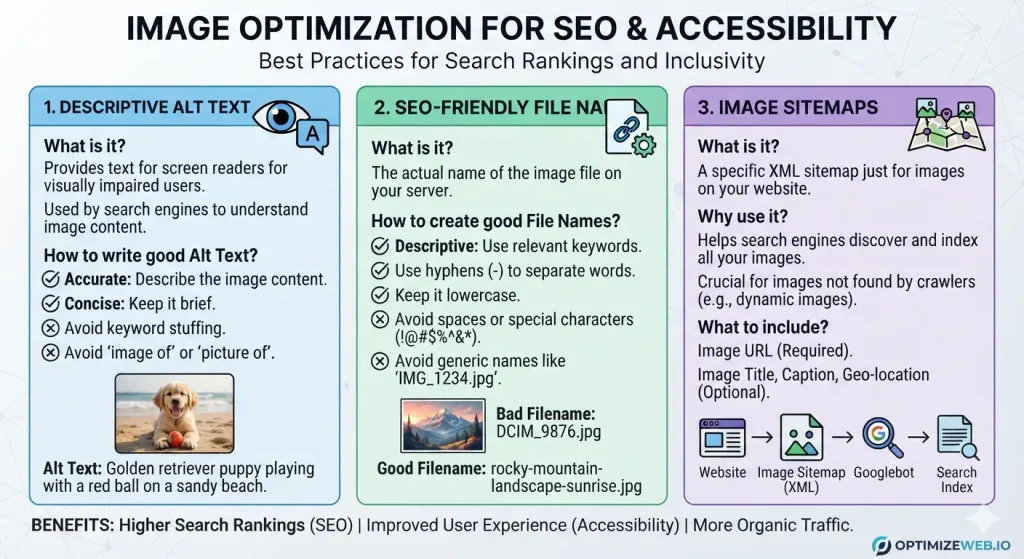
Google calls alt text the most important attribute for image metadata and warns against keyword stuffing. Image optimization for search means writing what the image shows, in the context of the page. File names should be short and descriptive, such as blue-ceramic-mug-front.jpg instead of IMG00023.JPG.
The W3C’s alt decision tree helps you choose: decorative images get an empty alt="", functional images describe the action or destination, and charts need their information explained in nearby text. If images load through JavaScript or CDNs, an image sitemap can help Google discover them.
For compliance context, the U.S. Justice Department’s 2022 web accessibility guidance applies to state and local governments and businesses open to the public, and points to WCAG as a resource rather than a mandated standard. I have not reviewed Australian or Canadian requirements, and none of this is legal advice, so confirm your obligations with a qualified adviser.
Delivery: CDN, Caching, and CMS Settings for Image Optimization
An image CDN serves files from a node near the visitor and can resize, compress and pick formats based on each browser’s Accept header. The Almanac cautions that CDNs do not shrink files by default. Give static images long cache lifetimes.
On WordPress, version 6.3 and later automatically adds fetchpriority to the image it judges most likely to be the LCP image and refines which images get lazy-loading. If a plugin overrides those attributes, test again.
How to Test Image Optimization and Fix Common Problems
To measure image optimization results, use PageSpeed Insights for lab and field data together, Search Console’s Core Web Vitals report for site-wide patterns, and Chrome DevTools to see which request is your LCP image. Field data reflects real visits at the 75th percentile, so improvements appear gradually.
| Symptom | Likely cause | Fix |
|---|---|---|
| Hero appears late | Lazy-loaded, low priority or CSS background | Remove lazy loading, add fetchpriority="high" |
| Page jumps while loading | Missing dimensions | Set width, height or aspect-ratio |
| Slow on phones only | Desktop-sized files sent to mobile | Use srcset and sizes |
| Blurry on high-density screens | Export too small | Provide a 2x width variant |
| Huge photo file | Photograph saved as PNG | Switch to JPEG, WebP or AVIF |
| Images missing from Google Images | CSS backgrounds, no <img src> | Use standard image elements |
Conclusion: Where to Start with Image Optimization
The evidence points the same way across every source above. Images are the largest byte category on the median home page and the LCP element on most pages. The highest-value image optimization work follows a sensible order: find your LCP element, resize it to the displayed dimensions, choose an efficient format with a fallback, serve responsive sizes, remove lazy loading from the hero and give it a priority hint, and reserve space with explicit dimensions. Then add alt text and descriptive file names.
Vodafone and the WordPress field data show real gains, but they came from bundles of changes or from fixing a specific mistake, and Google presents Core Web Vitals as one part of page experience, not a guaranteed ranking lever.
A practical next step is to pick your highest-traffic page, record its field and lab LCP, fix only the LCP image, and compare after a few weeks. If you also run paid campaigns, creative specifications differ by platform, so see this digital ad sizes guide.
How can I optimize my images for SEO?
Resize each image to the size it actually displays at, compress it, and use a modern format such as WebP with a JPEG fallback. Add descriptive alt text and a short file name, and place the image next to relevant text in a standard <img> element. Google’s image documentation lists these as its main recommendations.
Which image optimizer is the best?
No single optimizer is best for every site; the right choice depends on your image types, formats and workflow. For quick, private compression, try the Compress Image tool. It runs in your browser, lets you set a maximum width and quality, and exports JPG, PNG or WebP (it does not offer AVIF). Whatever tool you use, compare the result at display size before uploading.
What is the best way to name images for SEO?
Use short, descriptive, lowercase names with hyphens, such as blue-ceramic-mug-front.jpg instead of IMG00023.JPG. Google says file names give only light clues, so accuracy matters more than stuffing in keywords. Avoid generic names like image1.jpg.
What are common SEO mistakes?
The common image-related ones are missing alt text, oversized images, and lazy-loading the main hero image. Others are using CSS background images for content that should be indexed, and writing alt text or file names that repeat keywords. On the wider site, the usual mistakes are ignoring search intent and never checking real-user speed data in tools like Search Console.
What SEO practices should one avoid?
Avoid keyword stuffing, which Google’s documentation says can make a site look like spam. Also avoid decorative images with long alt text and informative images marked empty (alt=""). Don’t promise clients rankings or traffic, because no practice guarantees them.